
Motorcycle telemetry analysis
Upload your logger files to compare laps, inspect the recorded channels and replay sessions in 3D. See where you gained or lost time, then look at what changed on the bike.
7-day free trial. Card required. Cancel anytime.
Upload the data you already record
Native session files
Upload AiM .xrk / .drk, MoTeC .ld / .ldx and i2M .dat files directly. No conversion to a Lapfly-specific format.
Exports and GPS recordings
Use supported exports from 2D, RaceChrono, RaceBox and aRacer, native VBOX files, or GPS-enabled GoPro clips. Generic GPS CSV is available as a best-effort fallback.
Automatic format detection
Lapfly detects supported logger formats and maps recognised channels automatically. Check the imported channels, especially with a generic CSV or an unusual logger configuration.
Find where the laps separate
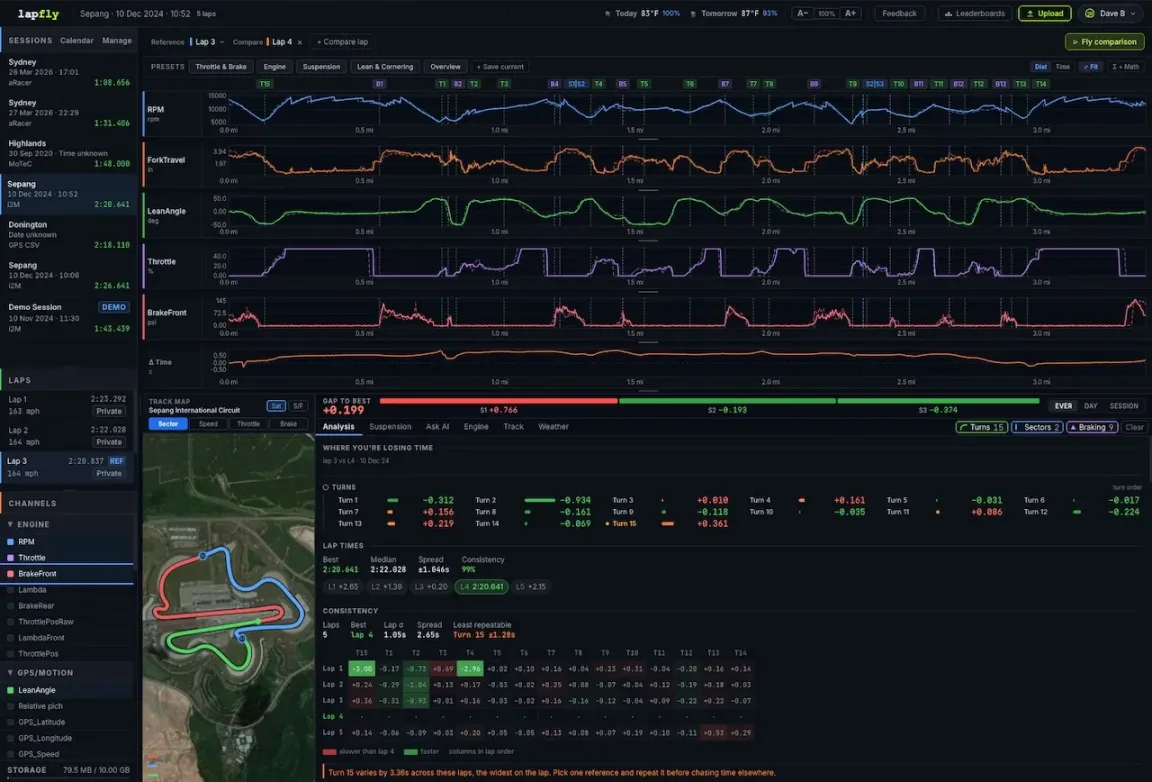
Overlay laps from the same session or compare sessions at the same circuit. Follow the time delta through a corner, then inspect speed, line and the inputs your logger recorded. Look at the entry, minimum-speed point and exit together.
See the same comparison in Fly
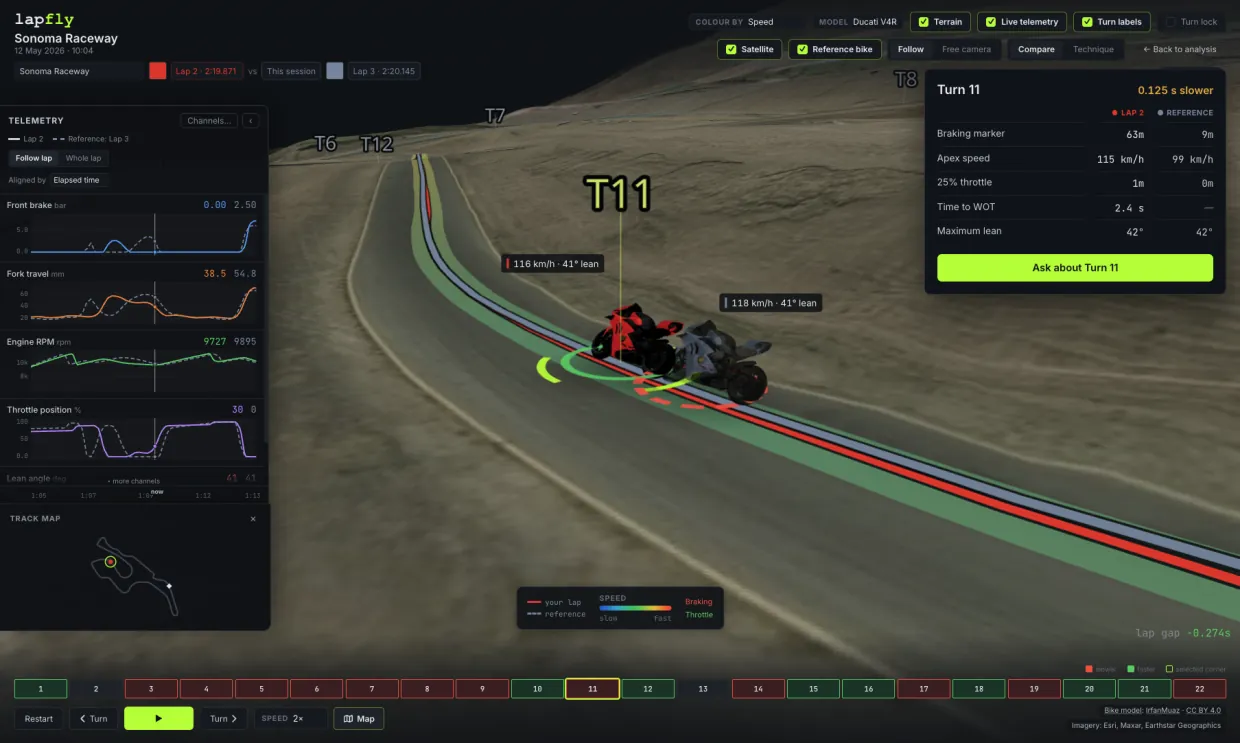
Replay recorded laps in 3D with a reference bike and synchronised telemetry. Pause and scrub through the corner to see how the GPS lines and available channels relate. Fly needs usable GPS; the track edges are illustrative.
Learn how to investigate a lap-time difference →AI analysis and bike setup
AI analysis you can check
Ask about a session or corner and review the recorded channels behind the explanation. Use the answer to guide your investigation, then check the comparison before deciding what to change.
Suspension and setup history
Review recorded fork and shock travel alongside the riding. Keep setup notes with sessions and compare changes over time. Travel-limit analysis also needs the component's physical stroke length; a peak reading alone is not proof that it bottomed out.
Which sensors do you need?
GPS position and speed support line, speed and lap comparison. Brake-pressure analysis needs a brake channel; throttle analysis needs throttle position; suspension analysis needs travel sensors. A GPS-only file cannot reveal inputs it never recorded.
Put your lap time in context
Browse public lap times at your circuit, then investigate your own laps with telemetry comparison. A leaderboard gives you a time benchmark; it does not mean another rider's telemetry is available as your reference.
Your laps are private by default. You choose which laps to make public.
Browse circuit leaderboards →Before you upload
Do I need to export AiM or MoTeC data to CSV?
No. Lapfly accepts native AiM .xrk / .drk and MoTeC .ld / .ldx files. The compatibility page lists formats and limitations for each logger.
Can I use a GPS-only recording?
Yes, if it contains usable position and speed in a supported format. You can explore line, speed and lap-time differences. Brake pressure, throttle, engine and suspension analysis require those recorded channels.
Can I compare different sessions?
Yes. Use another lap from the same session or a session at the same circuit as your reference. Consider changes in bike setup, tyres, weather and traffic when interpreting the difference.
Is this live telemetry?
Lapfly analyses uploaded recordings after the session. It does not provide live timing or stream telemetry from the bike.
Upload a session to Lapfly
7-day free trial. Card required. Cancel anytime.
Start your free trial